2013-09-23 12:45:18 +00:00
# Django Admin Sortable
2017-03-07 10:10:00 +00:00
[](https://pypi.python.org/pypi/django-admin-sortable)
[](https://pypi.python.org/pypi/django-admin-sortable)
2017-03-21 19:09:33 +00:00
[](https://travis-ci.org/alsoicode/django-admin-sortable)
2014-09-06 23:30:21 +00:00
2013-09-23 12:45:18 +00:00
This project makes it easy to add drag-and-drop ordering to any model in
Django admin. Inlines for a sortable model may also be made sortable,
enabling individual items or groups of items to be sortable.
2018-09-14 00:25:19 +00:00
If you find Django Admin Sortable to be helpful, consider [buying me a coffee ](https://www.buymeacoffee.com/NY9TUAEwF )!
2015-12-27 17:35:56 +00:00
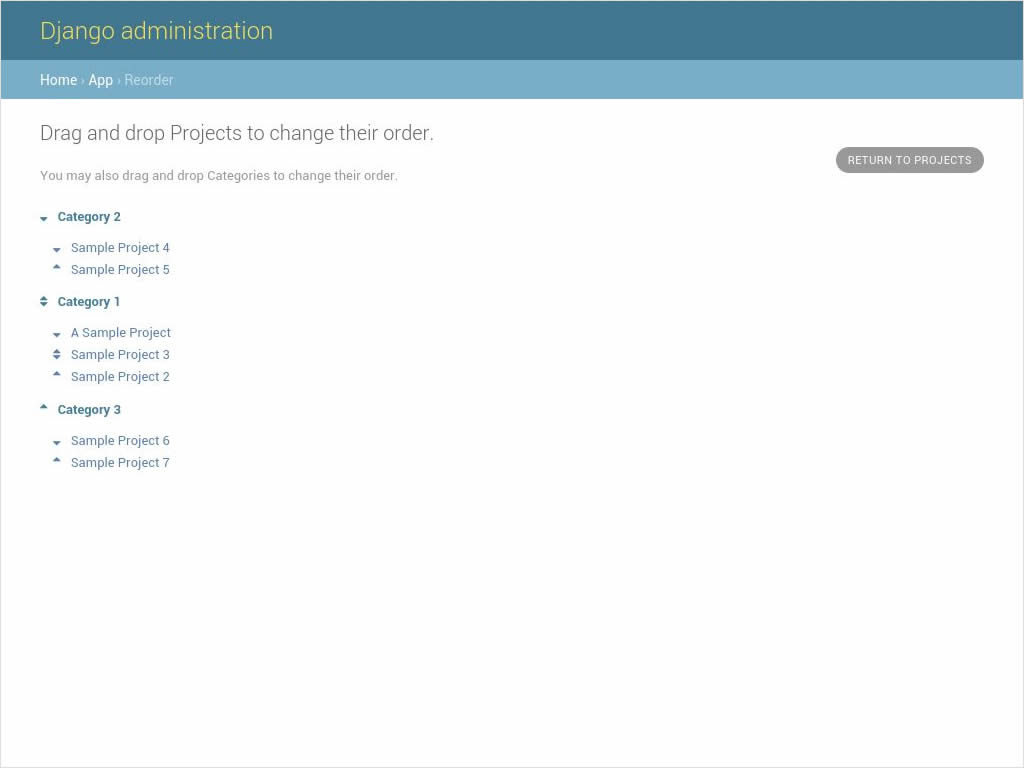
Sorting model instances with a sortable parent:
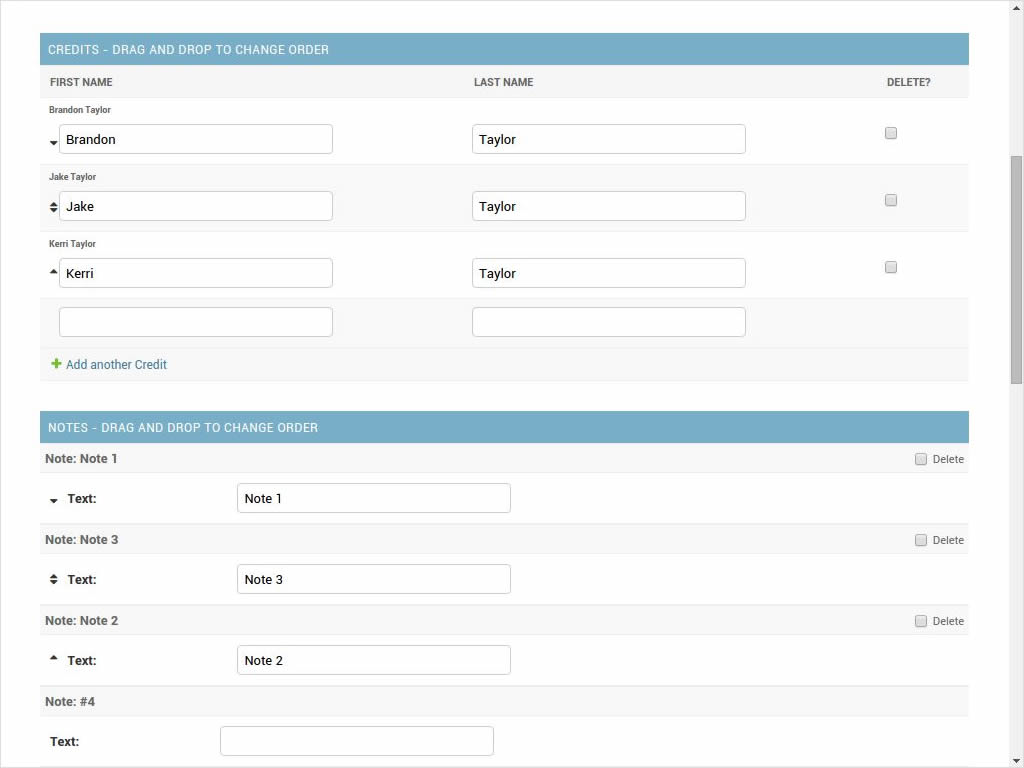
Sorting inlines:
2013-09-23 12:45:18 +00:00
## Supported Django Versions
2017-03-21 10:44:26 +00:00
For Django 1.5.x to 1.7.x, use version 2.0.18.
2013-09-23 12:45:18 +00:00
2017-03-21 10:44:26 +00:00
For Django 1.8.x or higher, use the latest version.
2016-08-09 01:48:11 +00:00
### Other notes of interest regarding versions
2013-09-23 12:45:18 +00:00
django-admin-sortable 1.5.2 introduced backward-incompatible changes for Django 1.4.x
2016-08-09 01:48:11 +00:00
django-admin-sortable 1.6.6 introduced a backward-incompatible change for the `sorting_filters` attribute. Please convert your attributes to the new tuple-based format if you haven't already.
2014-03-05 14:10:47 +00:00
2014-09-21 23:20:55 +00:00
django-admin-sortable 1.7.1 and higher are compatible with Python 3.
2018-10-10 18:02:11 +00:00
django-admin-sortable 2.1.6 has a bug. Please don't use it :)
2018-06-29 12:27:11 +00:00
2013-09-23 12:45:18 +00:00
## Installation
2014-07-15 02:46:34 +00:00
1. `$ pip install django-admin-sortable`
2013-09-23 12:45:18 +00:00
--or--
Download django-admin-sortable from [source ](https://github.com/iambrandontaylor/django-admin-sortable/archive/master.zip )
1. Unzip the directory and cd into the uncompressed project directory
2016-01-27 15:58:58 +00:00
2. * Optional: Enable your virtualenv
2013-09-23 12:45:18 +00:00
3. Run `$ python setup.py install` or add `adminsortable` to your PYTHONPATH.
## Configuration
1. Add `adminsortable` to your `INSTALLED_APPS` .
2017-03-07 12:51:43 +00:00
2. Ensure `django.template.context_processors.static` is in your `TEMPLATES["OPTIONS"]["context_processors"]` .
- (In older versions of Django, ensure `django.core.context_processors.static` is in `TEMPLATE_CONTEXT_PROCESSORS` instead.)
2016-01-28 15:26:19 +00:00
3. Ensure that `CSRF_COOKIE_HTTPONLY` has not been set to `True` , as
django-admin-sortable is currently incompatible with that setting.
2013-09-23 12:45:18 +00:00
2014-09-21 23:20:55 +00:00
2013-09-23 12:45:18 +00:00
### Static Media
Preferred:
2014-03-05 14:10:47 +00:00
Use the [staticfiles app ](https://docs.djangoproject.com/en/1.6/ref/contrib/staticfiles/ )
2013-09-23 12:45:18 +00:00
Alternate:
Copy the `adminsortable` folder from the `static` folder to the
location you serve static files from.
2014-09-21 23:20:55 +00:00
2013-09-23 12:45:18 +00:00
### Testing
Have a look at the included sample_project to see working examples.
The login credentials for admin are: admin/admin
When a model is sortable, a tool-area link will be added that says "Change Order".
Click this link, and you will be taken to the custom view where you can drag-and-drop
the records into order.
Inlines may be drag-and-dropped into any order directly from the change form.
## Usage
### Models
2015-12-27 17:17:21 +00:00
To add "sortability" to a model, you need to inherit `SortableMixin` and at minimum, define:
2015-08-24 13:18:54 +00:00
2015-09-08 01:26:36 +00:00
- The field which should be used for `Meta.ordering` , which must resolve to one of the integer fields defined in Django's ORM:
2015-08-24 13:18:54 +00:00
- `PositiveIntegerField`
- `IntegerField`
- `PositiveSmallIntegerField`
- `SmallIntegerField`
- `BigIntegerField`
2015-09-08 01:26:36 +00:00
- `Meta.ordering` **must only contain one value** , otherwise, your objects will not be sorted correctly.
2016-12-02 02:52:11 +00:00
- **IMPORTANT**: You must name the field you use for ordering something other than "order_field" as this name is reserved by the `SortableMixin` class.
2015-09-08 01:26:36 +00:00
- It is recommended that you set `editable=False` and `db_index=True` on the field defined in `Meta.ordering` for a seamless Django admin experience and faster lookups on the objects.
2015-08-24 13:18:54 +00:00
Sample Model:
2013-09-23 12:45:18 +00:00
2016-01-28 12:26:07 +00:00
```python
# models.py
from adminsortable.models import SortableMixin
class MySortableClass(SortableMixin):
title = models.CharField(max_length=50)
2016-02-23 18:35:21 +00:00
2016-01-28 12:26:07 +00:00
class Meta:
verbose_name = 'My Sortable Class'
verbose_name_plural = 'My Sortable Classes'
ordering = ['the_order']
2016-02-23 18:35:21 +00:00
2016-01-28 12:26:07 +00:00
# define the field the model should be ordered by
the_order = models.PositiveIntegerField(default=0, editable=False, db_index=True)
def __unicode__ (self):
return self.title
```
2015-08-24 16:55:56 +00:00
2016-10-12 10:09:49 +00:00
Support for models that don't use an `AutoField` for their primary key are also supported in version 2.0.20 or higher.
2015-08-24 16:55:56 +00:00
#### Common Use Case
2014-09-21 23:20:55 +00:00
A common use case is to have child objects that are sortable relative to a parent. If your parent object is also sortable, here's how you would set up your models and admin options:
2013-09-23 12:45:18 +00:00
2016-01-28 12:37:45 +00:00
```python
# models.py
from adminsortable.fields import SortableForeignKey
2013-09-23 12:45:18 +00:00
2016-01-28 12:37:45 +00:00
class Category(SortableMixin):
class Meta:
ordering = ['category_order']
verbose_name_plural = 'Categories'
2014-09-21 23:20:55 +00:00
2016-01-28 12:37:45 +00:00
title = models.CharField(max_length=50)
2014-09-21 23:20:55 +00:00
2016-01-28 12:37:45 +00:00
# ordering field
category_order = models.PositiveIntegerField(default=0, editable=False, db_index=True)
2015-08-24 13:18:54 +00:00
2016-01-28 12:37:45 +00:00
class Project(SortableMixin):
class Meta:
ordering = ['project_order']
2014-02-05 16:24:48 +00:00
2016-01-28 12:37:45 +00:00
category = SortableForeignKey(Category)
title = models.CharField(max_length=50)
2014-09-21 23:20:55 +00:00
2016-01-28 12:37:45 +00:00
# ordering field
project_order = models.PositiveIntegerField(default=0, editable=False, db_index=True)
2015-08-24 13:18:54 +00:00
2016-01-28 12:37:45 +00:00
def __unicode__ (self):
return self.title
2014-09-21 23:20:55 +00:00
2016-01-28 12:37:45 +00:00
# admin.py
from adminsortable.admin import SortableAdmin
2014-09-21 23:20:55 +00:00
2016-01-28 12:37:45 +00:00
from your_app.models import Category, Project
2014-09-21 23:20:55 +00:00
2016-01-28 12:37:45 +00:00
admin.site.register(Category, SortableAdmin)
admin.site.register(Project, SortableAdmin)
```
2014-09-21 23:20:55 +00:00
2014-10-25 00:43:12 +00:00
Sometimes you might have a parent model that is not sortable, but has child models that are. In that case define your models and admin options as such:
2014-09-21 23:20:55 +00:00
2016-01-28 12:37:45 +00:00
```python
from adminsortable.fields import SortableForeignKey
2014-09-21 23:20:55 +00:00
2016-01-28 12:37:45 +00:00
# models.py
class Category(models.Model):
class Meta:
verbose_name_plural = 'Categories'
2014-09-21 23:20:55 +00:00
2016-01-28 12:37:45 +00:00
title = models.CharField(max_length=50)
...
2013-09-23 12:45:18 +00:00
2016-01-28 12:37:45 +00:00
class Project(SortableMixin):
class Meta:
ordering = ['project_order']
2013-09-23 12:45:18 +00:00
2016-01-28 12:37:45 +00:00
category = SortableForeignKey(Category)
title = models.CharField(max_length=50)
2013-09-23 12:45:18 +00:00
2016-01-28 12:37:45 +00:00
# ordering field
project_order = models.PositiveIntegerField(default=0, editable=False, db_index=True)
2015-08-24 13:18:54 +00:00
2016-01-28 12:37:45 +00:00
def __unicode__ (self):
return self.title
2013-09-23 12:45:18 +00:00
2016-01-28 12:37:45 +00:00
# admin
from adminsortable.admin import NonSortableParentAdmin, SortableStackedInline
2014-09-21 23:20:55 +00:00
2016-01-28 12:37:45 +00:00
from your_app.models import Category, Project
2014-09-21 23:20:55 +00:00
2016-01-28 12:37:45 +00:00
class ProjectInline(SortableStackedInline):
model = Project
extra = 1
2014-09-21 23:20:55 +00:00
2016-01-28 12:37:45 +00:00
class CategoryAdmin(NonSortableParentAdmin):
inlines = [ProjectInline]
2014-09-21 23:20:55 +00:00
2016-01-28 12:37:45 +00:00
admin.site.register(Category, CategoryAdmin)
```
2014-09-21 23:20:55 +00:00
2014-10-25 00:43:12 +00:00
The `NonSortableParentAdmin` class is necessary to wire up the additional URL patterns and JavaScript that Django Admin Sortable needs to make your models sortable. The child model does not have to be an inline model, it can be wired directly to Django admin and the objects will be grouped by the non-sortable foreign key when sorting.
2013-09-23 12:45:18 +00:00
2015-08-24 16:55:56 +00:00
### Backwards Compatibility
If you previously used Django Admin Sortable, **DON'T PANIC** - everything will still work exactly as before ** *without any changes to your code***. Going forward, it is recommended that you use the new `SortableMixin` on your models, as pre-2.0 compatibility might not be a permanent thing.
Please note however that the `Sortable` class still contains the hard-coded `order` field, and meta inheritance requirements:
2016-01-28 12:37:45 +00:00
```python
2018-02-16 11:25:11 +00:00
# legacy model definition
2015-08-24 16:55:56 +00:00
2018-02-16 11:25:11 +00:00
from adminsortable.models import Sortable
2015-08-24 16:55:56 +00:00
2018-02-16 11:25:11 +00:00
class Project(Sortable):
class Meta(Sortable.Meta):
pass
title = models.CharField(max_length=50)
2015-08-24 16:55:56 +00:00
2018-02-16 11:25:11 +00:00
def __unicode__ (self):
return self.title
2016-01-28 12:37:45 +00:00
```
2015-08-24 16:55:56 +00:00
2014-09-06 19:32:54 +00:00
#### Model Instance Methods
Each instance of a sortable model has two convenience methods to get the next or previous instance:
2016-01-28 12:37:45 +00:00
```python
2014-09-06 19:32:54 +00:00
.get_next()
.get_previous()
2016-01-28 12:37:45 +00:00
```
2014-09-06 19:32:54 +00:00
By default, these methods will respect their order in relation to a `SortableForeignKey` field, if present. Meaning, that given the following data:
2014-09-06 19:41:24 +00:00
| Parent Model 1 | |
| | Child Model 1 |
| | Child Model 2 |
| Parent Model 2 | |
| | Child Model 3 |
| | Child Model 4 |
| | Child Model 5 |
2014-09-06 19:32:54 +00:00
"Child Model 2" `get_next()` would return `None`
"Child Model 3" `get_previous` would return `None`
If you wish to override this behavior, pass in: `filter_on_sortable_fk=False` :
2016-01-28 12:37:45 +00:00
```python
2014-09-06 19:32:54 +00:00
your_instance.get_next(filter_on_sortable_fk=False)
2016-01-28 12:37:45 +00:00
```
2014-09-06 19:32:54 +00:00
2018-10-10 18:02:11 +00:00
You may also pass in additional ORM "filer_args" as a list, or "filter_kwargs" as a dictionary, should you need to:
2014-09-06 19:32:54 +00:00
2016-01-28 12:37:45 +00:00
```python
2018-10-10 18:02:11 +00:00
your_instance.get_next(
filter_args=[Q(field1=True) | Q(field2=True)],
filter_kwargs={'title__icontains': 'blue'}
)
2016-01-28 12:37:45 +00:00
```
2014-09-06 19:32:54 +00:00
2018-10-10 18:02:11 +00:00
#### Deprecation Warning
2019-06-03 18:26:01 +00:00
Previously "filter_kwargs" was named "extra_filters". With the addition of "filter_args", "extra_filters" was renamed for consistency.
2018-10-10 18:02:11 +00:00
2015-08-24 13:18:54 +00:00
### Adding Sorting to an existing model
2014-09-21 23:28:33 +00:00
2016-10-12 10:09:49 +00:00
#### Django 1.5.x to 1.6.x
2015-08-24 13:18:54 +00:00
If you're adding Sorting to an existing model, it is recommended that you use [django-south ](http://south.areacode.com/ ) to create a schema migration to add the "order" field to your model. You will also need to create a data migration in order to add the appropriate values for the "order" column.
2013-09-23 12:45:18 +00:00
Example assuming a model named "Category":
2016-01-28 12:37:45 +00:00
```python
def forwards(self, orm):
for index, category in enumerate(orm.Category.objects.all()):
category.order = index + 1
category.save()
```
2013-09-23 12:45:18 +00:00
See: [this link ](http://south.readthedocs.org/en/latest/tutorial/part3.html ) for more
2014-09-21 23:28:33 +00:00
information on South Data Migrations.
#### Django 1.7.x or higher
Since schema migrations are built into Django 1.7, you don't have to use south, but the process of adding and running migrations is nearly identical. Take a look at the [Migrations ](https://docs.djangoproject.com/en/1.7/topics/migrations/ ) documentation to get started.
2013-09-23 12:45:18 +00:00
### Django Admin Integration
To enable sorting in the admin, you need to inherit from `SortableAdmin` :
2016-01-28 12:37:45 +00:00
```python
from django.contrib import admin
from myapp.models import MySortableClass
from adminsortable.admin import SortableAdmin
2013-09-23 12:45:18 +00:00
2016-01-28 12:37:45 +00:00
class MySortableAdminClass(SortableAdmin):
"""Any admin options you need go here"""
2013-09-23 12:45:18 +00:00
2016-01-28 12:37:45 +00:00
admin.site.register(MySortableClass, MySortableAdminClass)
```
2013-09-23 12:45:18 +00:00
To enable sorting on TabularInline models, you need to inherit from
SortableTabularInline:
2016-01-28 12:37:45 +00:00
```python
from adminsortable.admin import SortableTabularInline
2013-09-23 12:45:18 +00:00
2016-01-28 12:37:45 +00:00
class MySortableTabularInline(SortableTabularInline):
"""Your inline options go here"""
```
2013-09-23 12:45:18 +00:00
To enable sorting on StackedInline models, you need to inherit from
SortableStackedInline:
2016-01-28 12:37:45 +00:00
```python
from adminsortable.admin import SortableStackedInline
2013-09-23 12:45:18 +00:00
2016-01-28 12:37:45 +00:00
class MySortableStackedInline(SortableStackedInline):
"""Your inline options go here"""
```
2013-09-23 12:45:18 +00:00
There are also generic equivalents that you can inherit from:
2016-01-28 12:37:45 +00:00
```python
from adminsortable.admin import (SortableGenericTabularInline,
SortableGenericStackedInline)
"""Your generic inline options go here"""
```
2013-09-23 12:45:18 +00:00
2014-09-21 23:20:55 +00:00
If your parent model is *not* sortable, but has child inlines that are, your parent model needs to inherit from `NonSortableParentAdmin` :
2016-01-28 12:37:45 +00:00
```python
from adminsortable.admin import (NonSortableParentAdmin,
SortableTabularInline)
2014-09-21 23:20:55 +00:00
2016-01-28 12:37:45 +00:00
class ChildTabularInline(SortableTabularInline):
model = YourModel
2014-09-21 23:20:55 +00:00
2016-01-28 12:37:45 +00:00
class ParentAdmin(NonSortableParentAdmin):
inlines = [ChildTabularInline]
```
2014-09-21 23:20:55 +00:00
2014-02-05 20:11:49 +00:00
#### Overriding `queryset()`
2013-11-23 14:32:51 +00:00
django-admin-sortable supports custom queryset overrides on admin models
2013-09-23 12:45:18 +00:00
and inline models in Django admin!
If you're providing an override of a SortableAdmin or Sortable inline model,
you don't need to do anything extra. django-admin-sortable will automatically
honor your queryset.
Have a look at the WidgetAdmin class in the sample project for an example of
an admin class with a custom `queryset()` override.
#### Overriding `queryset()` for an inline model
This is a special case, which requires a few lines of extra code to properly
determine the sortability of your model. Example:
2016-01-28 12:37:45 +00:00
```python
# add this import to your admin.py
from adminsortable.utils import get_is_sortable
2013-09-23 12:45:18 +00:00
2016-01-28 12:37:45 +00:00
class ComponentInline(SortableStackedInline):
model = Component
2013-09-23 12:45:18 +00:00
2016-01-28 12:37:45 +00:00
def queryset(self, request):
qs = super(ComponentInline, self).queryset(request).filter(
title__icontains='foo')
2013-09-23 12:45:18 +00:00
2016-01-28 12:37:45 +00:00
# You'll need to add these lines to determine if your model
# is sortable once we hit the change_form() for the parent model.
2013-09-23 12:45:18 +00:00
2016-01-28 12:37:45 +00:00
if get_is_sortable(qs):
self.model.is_sortable = True
else:
self.model.is_sortable = False
return qs
```
2013-09-23 12:45:18 +00:00
If you override the queryset of an inline, the number of objects present
may change, and adminsortable won't be able to automatically determine
if the inline model is sortable from here, which is why we have to set the
`is_sortable` property of the model in this method.
2014-03-05 14:10:47 +00:00
#### Sorting subsets of objects
It is also possible to sort a subset of objects in your model by adding a `sorting_filters` tuple. This works exactly the same as `.filter()` on a QuerySet, and is applied *after* `get_queryset()` on the admin class, allowing you to override the queryset as you would normally in admin but apply additional filters for sorting. The text "Change Order of" will appear before each filter in the Change List template, and the filter groups are displayed from left to right in the order listed. If no `sorting_filters` are specified, the text "Change Order" will be displayed for the link.
2014-11-03 15:50:02 +00:00
#### Self-Referential SortableForeignKey
You can specify a self-referential SortableForeignKey field, however the admin interface will currently show a model that is a grandchild at the same level as a child. I'm working to resolve this issue.
2015-12-23 22:22:53 +00:00
##### Important!
2014-11-03 15:50:02 +00:00
django-admin-sortable 1.6.6 introduced a backwards-incompatible change for `sorting_filters` . Previously this attribute was defined as a dictionary, so you'll need to change your values over to the new tuple-based format.
2014-02-05 16:24:48 +00:00
2014-03-05 14:10:47 +00:00
An example of sorting subsets would be a "Board of Directors". In this use case, you have a list of "People" objects. Some of these people are on the Board of Directors and some not, and you need to sort them independently.
2014-02-05 16:24:48 +00:00
2016-01-28 12:37:45 +00:00
```python
class Person(Sortable):
class Meta(Sortable.Meta):
verbose_name_plural = 'People'
2014-03-05 14:10:47 +00:00
2016-01-28 12:37:45 +00:00
first_name = models.CharField(max_length=50)
last_name = models.CharField(max_length=50)
is_board_member = models.BooleanField('Board Member', default=False)
2014-03-05 14:10:47 +00:00
2016-01-28 12:37:45 +00:00
sorting_filters = (
('Board Members', {'is_board_member': True}),
('Non-Board Members', {'is_board_member': False}),
)
2014-03-05 14:10:47 +00:00
2016-01-28 12:37:45 +00:00
def __unicode__ (self):
return '{} {}'.format(self.first_name, self.last_name)
```
2014-02-05 16:24:48 +00:00
2013-09-23 12:45:18 +00:00
#### Extending custom templates
By default, adminsortable's change form and change list views inherit from
Django admin's standard templates. Sometimes you need to have a custom change
form or change list, but also need adminsortable's CSS and JavaScript for
inline models that are sortable for example.
2014-03-05 14:10:47 +00:00
SortableAdmin has two attributes you can override for this use case:
2013-09-23 12:45:18 +00:00
2016-01-28 12:37:45 +00:00
```python
change_form_template_extends
change_list_template_extends
```
2013-09-23 12:45:18 +00:00
2014-03-05 14:10:47 +00:00
These attributes have default values of:
2013-09-23 12:45:18 +00:00
2016-01-28 12:37:45 +00:00
```python
2018-02-16 11:25:11 +00:00
change_form_template_extends = 'admin/change_form.html'
change_list_template_extends = 'admin/change_list.html'
2016-01-28 12:37:45 +00:00
```
2013-09-23 12:45:18 +00:00
2018-03-20 00:54:23 +00:00
If you need to extend the inline change form templates, you'll need to select the right one, depending on your version of Django. For 1.10.x or below, you'll need to extend one of the following:
2013-11-26 03:08:08 +00:00
2018-03-20 00:54:23 +00:00
templates/adminsortable/edit_inline/stacked-1.10.x.html
templates/adminsortable/edit_inline/tabular-inline-1.10.x.html
2013-11-26 03:08:08 +00:00
2018-03-20 00:54:23 +00:00
otherwise, extend:
2013-11-26 03:08:08 +00:00
templates/adminsortable/edit_inline/stacked.html
templates/adminsortable/edit_inline/tabular.html
2013-09-23 12:45:18 +00:00
#### A Special Note About Stacked Inlines...
The height of a stacked inline model can dynamically increase,
which can make them difficult to sort. If you anticipate the height of a
stacked inline is going to be very tall, I would suggest using
2015-12-21 16:59:38 +00:00
SortableTabularInline instead.
2013-09-23 12:45:18 +00:00
2018-06-18 15:58:52 +00:00
#### Custom JS callbacks after sorting is complete
If you need to define a custom event or other callback to be executed after sorting is completed, you'll need to:
1. Create a custom template for to add your JavaScript
2. Populate the `after_sorting_js_callback_name` on your model admin
An example of this can be found in the "samples" application in the source. Here's a model admin for a model called "Project":
```python
class ProjectAdmin(SortableAdmin):
inlines = [
CreditInline, NoteInline, GenericNoteInline,
NonSortableCreditInline, NonSortableNoteInline
]
list_display = ['__str__', 'category']
after_sorting_js_callback_name = 'afterSortCallback' # do not include () - just function name
sortable_change_list_template = 'adminsortable/custom_change_list.html'
sortable_change_form_template = "adminsortable/custom_change_form.html"
```
This example is going to add a custom callback on the parent model, and it's inlines. Here is the JavaScript added to the custom change list:
```html+django
{% extends 'adminsortable/change_list.html' %}
{% block extrahead %}
{{ block.super }}
< script >
django.jQuery(document).on('order:changed', function(event) {
console.log(event.message);
// your code here
});
window['{{ after_sorting_js_callback_name }}'] = function() {
django.jQuery(document).trigger({ type: 'order:changed', message: 'Order changed', time: new Date() });
};
< / script >
{% endblock %}
```
and the custom change form, for the inline models:
```html+django
{% extends "adminsortable/change_form.html" %}
{% block extrahead %}
{{ block.super }}
< script >
django.jQuery(document).on('order:changed', function(event) {
console.log(event.message);
// your code here
});
window['{{ after_sorting_js_callback_name }}'] = function() {
django.jQuery(document).trigger({ type: 'order:changed', message: 'Order changed', time: new Date() });
};
< / script >
{% endblock %}
```
Ideally, you'd pull in a shared piece of code for your callback to keep your code DRY.
2013-09-23 13:10:56 +00:00
### Django-CMS integration
Django-CMS plugins use their own change form, and thus won't automatically
include the necessary JavaScript for django-admin-sortable to work. Fortunately,
this is easy to resolve, as the `CMSPlugin` class allows a change form template to be
specified:
2016-01-28 12:37:45 +00:00
```python
# example plugin
from cms.plugin_base import CMSPluginBase
class CMSCarouselPlugin(CMSPluginBase):
admin_preview = False
change_form_template = 'cms/sortable-stacked-inline-change-form.html'
inlines = [SlideInline]
model = Carousel
name = _('Carousel')
render_template = 'carousels/carousel.html'
def render(self, context, instance, placeholder):
context.update({
'carousel': instance,
'placeholder': placeholder
})
return context
plugin_pool.register_plugin(CMSCarouselPlugin)
```
2013-09-23 13:10:56 +00:00
The contents of `sortable-stacked-inline-change-form.html` at a minimum need to extend
the extrahead block with:
2018-02-16 11:25:11 +00:00
```html+django
2016-01-28 12:37:45 +00:00
{% extends "admin/cms/page/plugin_change_form.html" %}
{% load static from staticfiles %}
2013-09-23 13:10:56 +00:00
2016-01-28 12:37:45 +00:00
{% block extrahead %}
{{ block.super }}
2017-10-13 10:40:35 +00:00
< script src = "{% static 'adminsortable/js/jquery-ui-django-admin.min.js' %}" > < / script >
< script src = "{% static 'adminsortable/js/jquery.ui.touch-punch.min.js' %}" > < / script >
< script src = "{% static 'adminsortable/js/jquery.django-csrf.js' %}" > < / script >
< script src = "{% static 'adminsortable/js/admin.sortable.stacked.inlines.js' %}" > < / script >
2013-09-23 13:10:56 +00:00
2016-01-28 12:37:45 +00:00
< link rel = "stylesheet" type = "text/css" href = "{% static 'adminsortable/css/admin.sortable.inline.css' %}" / >
{% endblock extrahead %}
```
2013-09-23 13:10:56 +00:00
2015-12-27 17:17:21 +00:00
Sorting within Django-CMS is really only feasible for inline models of a plugin as Django-CMS already includes sorting for plugin instances. For tabular inlines, just substitute:
2013-09-23 13:10:56 +00:00
2018-02-16 11:25:11 +00:00
```html+django
< script src = "{% static 'adminsortable/js/admin.sortable.stacked.inlines.js' %}" > < / script >
2016-01-28 12:37:45 +00:00
```
2013-09-23 13:10:56 +00:00
with:
2018-02-16 11:25:11 +00:00
```html+django
< script src = "{% static 'adminsortable/js/admin.sortable.tabular.inlines.js' %}" > < / script >
2016-01-28 12:37:45 +00:00
```
2013-09-23 13:10:56 +00:00
2017-02-01 09:48:39 +00:00
### Notes
From ``django-cms 3.x`` the path of change_form.html has changed. Replace the follwing line:
2018-02-16 11:25:11 +00:00
```html+django
{% extends "admin/cms/page/plugin_change_form.html" %}
2017-02-01 09:48:39 +00:00
```
with
2018-02-16 11:25:11 +00:00
```html+django
{% extends "admin/cms/page/plugin/change_form.html" %}
2017-02-01 09:48:39 +00:00
```
From ``django-admin-sortable 2.0.13`` the ``jquery.django-csrf.js`` was removed and you have to include the snippet-template.
Change the following line:
2018-02-16 11:25:11 +00:00
```html+django
< script type = "text/javascript" src = "{% static 'adminsortable/js/jquery.django-csrf.js' %}" > < / script >
2017-02-01 09:48:39 +00:00
```
to
2018-02-16 11:25:11 +00:00
```html+django
{% include 'adminsortable/csrf/jquery.django-csrf.html' with csrf_cookie_name='csrftoken' %}
2017-02-01 09:48:39 +00:00
```
Please note, if you change the ``CSRF_COOKIE_NAME`` you have to adjust ``csrf_cookie_name='YOUR_CSRF_COOKIE_NAME'``
2013-09-23 12:45:18 +00:00
### Rationale
Other projects have added drag-and-drop ordering to the ChangeList
view, however this introduces a couple of problems...
- The ChangeList view supports pagination, which makes drag-and-drop
ordering across pages impossible.
- The ChangeList view by default, does not order records based on a
foreign key, nor distinguish between rows that are associated with a
foreign key. This makes ordering the records grouped by a foreign key
impossible.
- The ChangeList supports in-line editing, and adding drag-and-drop
ordering on top of that just seemed a little much in my opinion.
### Status
django-admin-sortable is currently used in production.
2019-08-28 11:53:50 +00:00
### What's new in 2.1.18?
- Fixed scoping issue with Font Awesome Icons if you're using a custom widget in inline models
2013-09-23 12:45:18 +00:00
### Future
2015-01-13 03:56:38 +00:00
- Better template support for foreign keys that are self referential. If someone would like to take on rendering recursive sortables, that would be super.
2013-09-23 12:45:18 +00:00
### License
django-admin-sortable is released under the Apache Public License v2.
