 349fca66f3
The order of nested InlinePanels (recently formally added in 5566) doesn't get saved properly due to some now-invalid assumptions in the JS selector code. Currently, Wagtail users can use the editor up/down arrows to order InlinePanel elements that contain child InlinePanels, but these may not be properly saved. Before InlinePanel nesting was supported, it was a safer bet that a child panel would only contain one hidden input named "-ORDER". With nesting, however, a parent panel will also contain hidden inputs named like this for its child panels. This breaks the logic used in the ordering code. This change modifies the logic to use the jQuery `.children()` selector instead of `.next()`, ensuring that we reference the correct adjacent panel item. An easy way to test this against current master is to use the Wagtail testapp test models that exercise this behavior: 1. `wagtail start testwagtail` to create a new project. 2. `cd testwagtail` 3. Edit testwagtail/settings/base.py to add the Wagtail test application `'wagtail.tests.testapp'` to the list of `INSTALLED_APPS`. For the admin to work properly with this app, you also need to add `'wagtail.contrib.settings'` to that list and copy the definition of `WAGTAILADMIN_RICH_TEXT_EDITORS` from wagtail/tests/settings.py. 4. `./manage.py migrate` to create your local database. 5. `./manage.py createsuperuser` to create an admin user. 6. Create a new Event Page (http://localhost:8000/admin/pages/add/tests/eventpage/3/). 7. Fill in all required items, and then add multiple speakers under "Speaker Lineup". For each speaker, add at least one Award. Save the page. 8. Try using the up/down arrows to reorder the speakers (the parent InlinePanel), and save the page. 9. Note that when the page reloads, the ordering hasn't been saved. If you debug using the developer tools, you'll notice that this is because the code being modified here selects the child panel items instead of the adjacent parent panel item. |
||
|---|---|---|
| .circleci | ||
| .github | ||
| .tx | ||
| client | ||
| docs | ||
| etc | ||
| gulpfile.js | ||
| scripts | ||
| wagtail | ||
| .coveragerc | ||
| .editorconfig | ||
| .eslintignore | ||
| .eslintrc | ||
| .gitignore | ||
| .nvmrc | ||
| .readthedocs.yml | ||
| .squash.yml | ||
| .stylelintrc.yaml | ||
| .travis.yml | ||
| appveyor.yml | ||
| CHANGELOG.txt | ||
| CODE_OF_CONDUCT.md | ||
| codecov.yml | ||
| conftest.py | ||
| CONTRIBUTORS.rst | ||
| LICENSE | ||
| Makefile | ||
| MANIFEST.in | ||
| package-lock.json | ||
| package.json | ||
| README.md | ||
| runtests.py | ||
| SECURITY.md | ||
| setup.cfg | ||
| setup.py | ||
| SPONSORS.md | ||
| tox.ini | ||

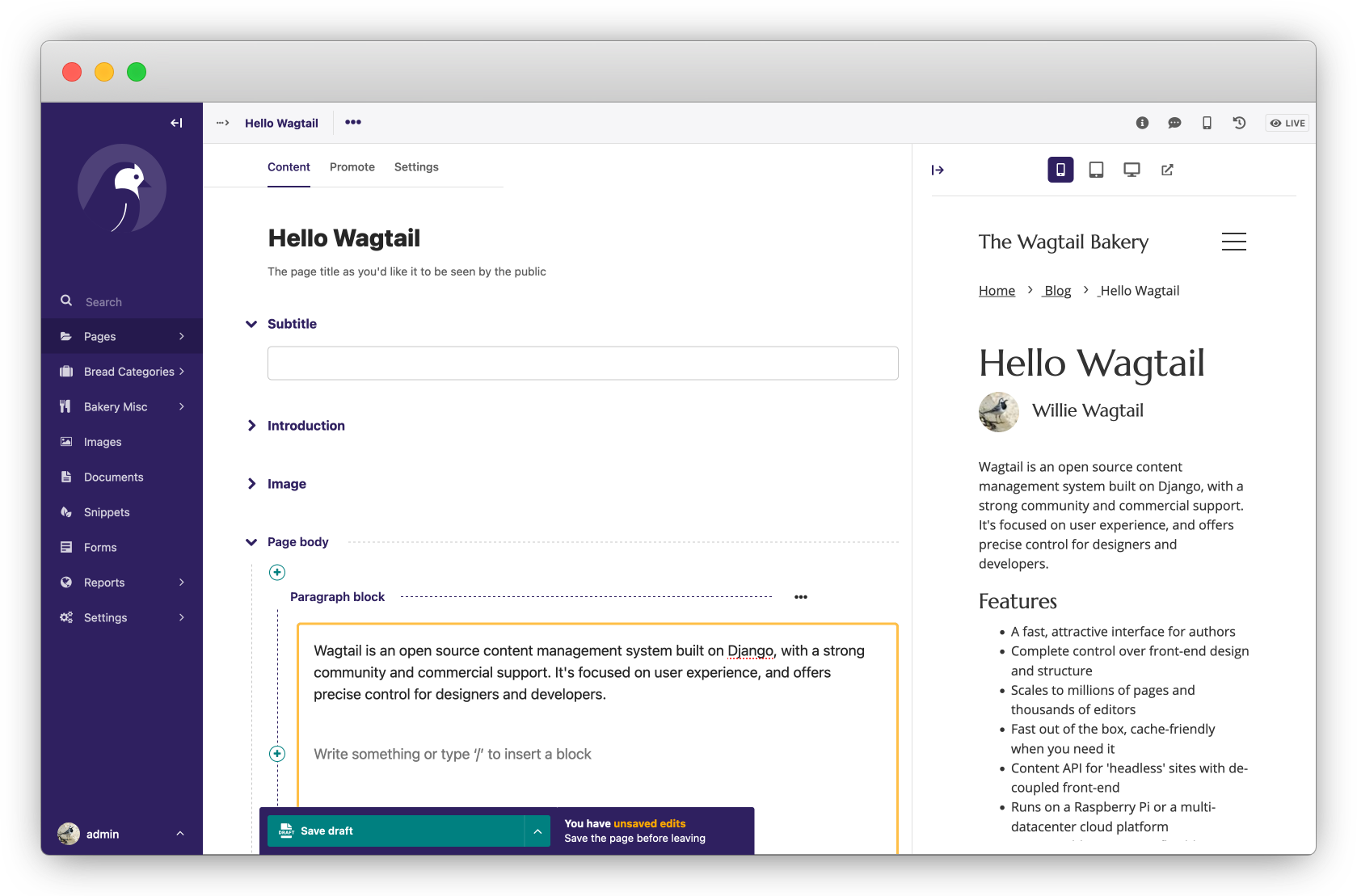
Wagtail is an open source content management system built on Django, with a strong community and commercial support. It's focused on user experience, and offers precise control for designers and developers.
Features
- A fast, attractive interface for authors
- Complete control over front-end design and structure
- Scales to millions of pages and thousands of editors
- Fast out of the box, cache-friendly when you need it
- Content API for 'headless' sites with de-coupled front-end
- Runs on a Raspberry Pi or a multi-datacenter cloud platform
- StreamField encourages flexible content without compromising structure
- Powerful, integrated search, using Elasticsearch or PostgreSQL
- Excellent support for images and embedded content
- Multi-site and multi-language ready
- Embraces and extends Django
Find out more at wagtail.io.
Getting started
Wagtail works with Python 3, on any platform.
To get started with Wagtail, run the following in a virtual environment:
pip install wagtail
wagtail start mysite
cd mysite
pip install -r requirements.txt
python manage.py migrate
python manage.py createsuperuser
python manage.py runserver
For detailed installation and setup docs, see docs.wagtail.io.
Who’s using it?
Wagtail is used by NASA, Google, Oxfam, the NHS, Mozilla, MIT, the Red Cross, Salesforce, NBC, BMW, and the US and UK governments. Add your own Wagtail site to madewithwagtail.org.
Documentation
docs.wagtail.io is the full reference for Wagtail, and includes guides for developers, designers and editors, alongside release notes and our roadmap.
Compatibility
(If you are reading this on GitHub, the details here may not be indicative of the current released version - please see Compatible Django / Python versions in the Wagtail documentation.)
Wagtail supports:
- Django 2.1.x, 2.2.x and 3.0.x
- Python 3.5, 3.6, 3.7 and 3.8
- PostgreSQL, MySQL and SQLite as database backends
Previous versions of Wagtail additionally supported Python 2.7 and Django 1.x.
Community Support
There is an active community of Wagtail users and developers responding to questions on Stack Overflow. When posting questions, please read Stack Overflow's advice on how to ask questions and remember to tag your question "wagtail".
For topics and discussions that do not fit Stack Overflow's question and answer format, we have a Slack workspace and a Wagtail Support mailing list. Please respect the time and effort of volunteers by not asking the same question in multiple places.
We maintain a curated list of third party packages, articles and other resources at Awesome Wagtail.
Commercial Support
Wagtail is sponsored by Torchbox. If you need help implementing or hosting Wagtail, please contact us: hello@torchbox.com. See also madewithwagtail.org/developers/ for expert Wagtail developers around the world.
Security
We take the security of Wagtail, and related packages we maintain, seriously. If you have found a security issue with any of our projects please email us at security@wagtail.io so we can work together to find and patch the issue. We appreciate responsible disclosure with any security related issues, so please contact us first before creating a Github issue.
If you want to send an encrypted email (optional), the public key ID for security@wagtail.io is 0x6ba1e1a86e0f8ce8, and this public key is available from most commonly-used keyservers.
Release schedule
Feature releases of Wagtail are released every three months. Selected releases are designated as Long Term Support (LTS) releases, and will receive maintenance updates for an extended period to address any security and data-loss related issues. For dates of past and upcoming releases and support periods, see Release Schedule.
Nightly releases
To try out the latest features before a release, we also create builds from master every night. You can find instructions on how to install the latest nightly release at https://releases.wagtail.io/nightly/index.html
Contributing
If you're a Python or Django developer, fork the repo and get stuck in! We run a separate group for developers of Wagtail itself at https://groups.google.com/forum/#!forum/wagtail-developers (please note that this is not for support requests).
You might like to start by reviewing the contributing guidelines and checking issues with the good first issue label.
We also welcome translations for Wagtail's interface. Translation work should be submitted through Transifex.
License
Thanks
We thank the following organisations for their services used in Wagtail's development:

BrowserStack provides the project with free access to their live web-based browser testing tool, and automated Selenium cloud testing.

Squash provides the project with free test environments for reviewing pull requests.



